CMDB Integration for AI Infrastructure: Northbound APIs, ITSM, Webhooks
CMDB integration that keeps your configuration records true to the GPU estate, plus metrics from your clouds and alerts routed to the tools your teams already use.
An AI data center rarely starts from nothing. It has an ITSM tool, a CMDB, a paging tool and some cloud capacity. The Sensaka for AI Data Centers runs on-premises and connects to them instead of replacing them.
The CMDB Says One Thing, the GPU Racks Say Another
GPU servers change faster than most configuration databases. Cards are swapped under warranty, firmware is updated, nodes move between clusters and projects borrow capacity for a few weeks. If the CMDB is maintained by hand, it falls behind, and every incident starts with someone checking whether the record is still right.
Meanwhile the operations picture is split across systems: cloud consoles for burst capacity, the paging tool for alerts, the ITSM for tickets. Integration is what lets one platform read from the estate and hand the right facts to each of those systems.
Metrics In, Records and Signals Out
Data comes in from two directions: telemetry from your own hardware and facility, and metrics from your clouds. It leaves in three: CMDB and ticket sync with your ITSM, alerts to your paging and chat tools, and a REST API with webhooks for your own systems.
In-Band and Out-of-Band, Across 14 Protocols
Good integration starts with good data. Sensaka collects from the estate on two tracks that complement each other:
Hardware monitoring through the BMC is agentless. For background on the out-of-band track, see out-of-band monitoring.
Cloud Capacity in the Same View as Your GPU Clusters
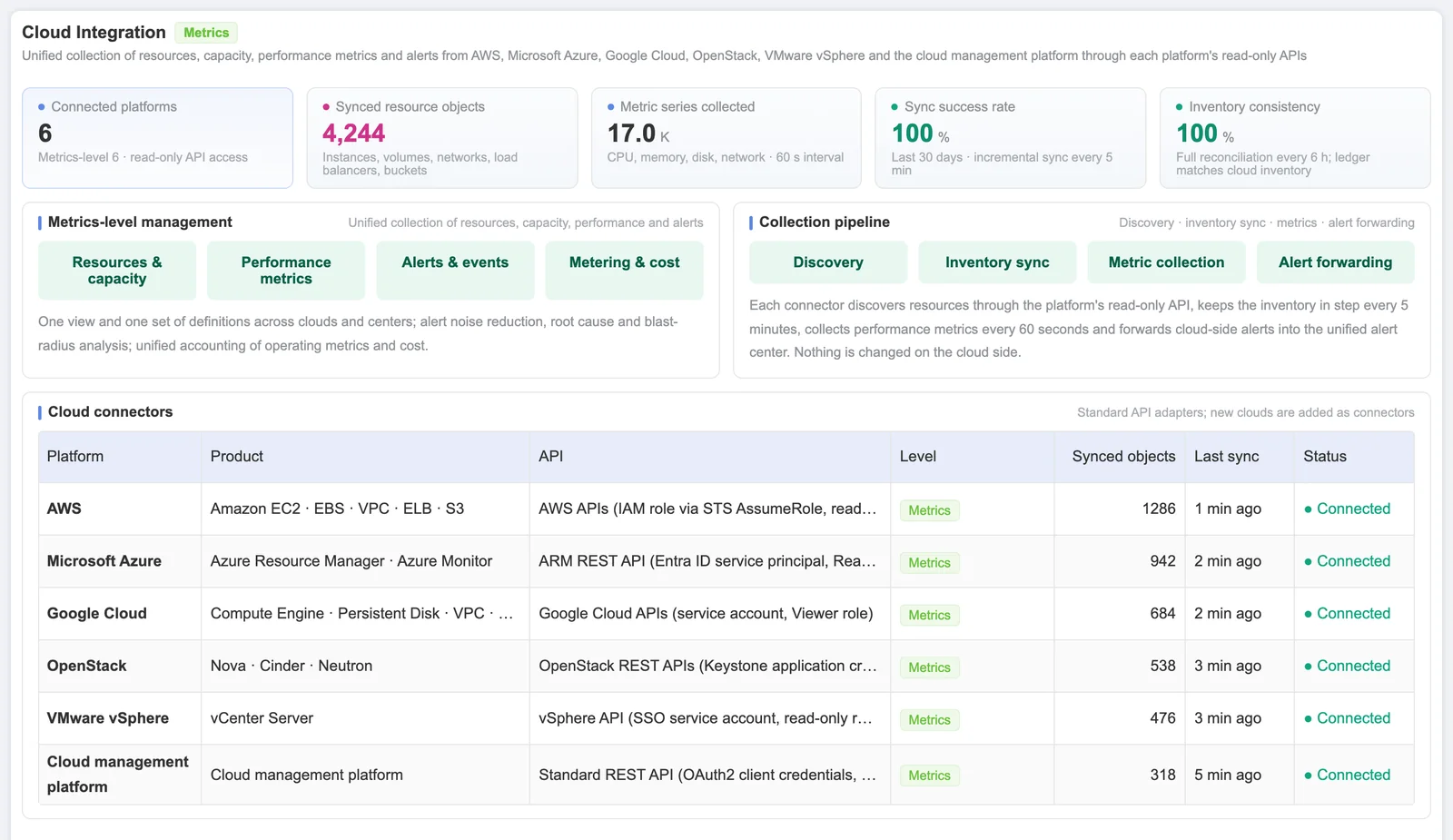
Sensaka collects resources, capacity, performance and alarms from the clouds you use, so on-premises and cloud capacity are counted with the same definitions. Alerts from both feed the same correlation and root cause analysis, and operating metrics and cost can be reported together.
The integration is read-only at the metrics level. Provisioning, changes and decommissioning of cloud resources stay in each cloud's own console and tooling.
What Sensaka Can Push Into Your CMDB
The facts below are read from the hardware and the schedulers rather than typed in, which is why they stay current. Which of them flow into your CMDB, and which system owns each field, is agreed during scoping.
The relationship model behind these records is described on the AI infrastructure CMDB page. For the general concept, see what CMDB integration is.
Northbound Interfaces: Tickets, Alerts and APIs
Northbound means everything the platform hands up to the systems above it. There are three paths.
ITSM and CMDB
Sensaka includes its own ITSM, workflows and CMDB, and syncs with ServiceNow or Jira when those are your system of record. An impact analysis can open a ticket for the responsible team.
Alert routing
Correlated alerts go where your teams already work: PagerDuty, OpsGenie, Slack, Jira, email or a webhook, with routing rules per severity and team.
REST API and webhooks
Your own tools can read from the platform through its REST API and receive events through webhooks. The scope of each interface is agreed when the pilot is planned.
Usage records for finance follow the same pattern: Sensaka produces traceable GPU-hour records through GPU usage metering, and invoicing stays in your billing system. The same correlated alerts drive the AI infrastructure observability views.
Frequently Asked Questions
How does ServiceNow CMDB integration work with Sensaka?
Sensaka discovers hardware and accelerator inventory and the relationships between devices, clusters and workloads, then syncs those records with ServiceNow so the CMDB reflects what is actually installed. Which classes and fields are synced, and which system owns each field, is agreed during scoping.
What is CMDB enrichment, and what does Sensaka push into our CMDB?
CMDB enrichment means filling configuration items with data the CMDB cannot collect on its own. Sensaka can supply hardware facts read from the BMC (model, serial number, firmware, component health), accelerator inventory, rack and site location, warranty dates, and relationships from GPU to node, cluster, workload and owner.
Do we need to replace our existing CMDB?
No. Sensaka can act as the AI infrastructure data source for an existing enterprise CMDB, or run as the CMDB itself if you do not have one. The right split depends on data ownership and your current processes.
Which clouds can Sensaka collect from?
AWS, Microsoft Azure, Google Cloud, OpenStack and VMware. Sensaka collects resources, capacity, performance and alarms from them at the metrics level, so on-premises GPU clusters and cloud capacity appear in one view with the same definitions.
Can Sensaka make changes in our clouds?
No. Cloud integration is read-only at the metrics level. Provisioning, changes and decommissioning of cloud resources stay in each cloud's own console and tooling.
Does integration send data outside our network?
Sensaka runs on-premises. Data leaves the platform only through the integrations you configure, such as a ticket sync with your ITSM or an alert to your paging tool, and only to the destinations you choose.
Other Parts of the Same Platform
Every solution below runs on Sensaka for AI Data Centers and shares one inventory and one data foundation.
Connect Sensaka to the Tools You Already Run
A free on-premises pilot includes the integrations you need to judge the platform, such as alert routing to your paging tool and a comparison of the discovered inventory with your existing asset records.
The pilot runs on-premises for 30 days, free of charge, with success criteria agreed before it starts.
Integrators and resellers: the Sensaka partner programme offers a 25% margin in the first year. Talk to us.