AI Ops Dashboard: Ask a Question, Get a Board and a 30-Second Data Video
An AI ops dashboard you query in plain language. Type a question about your AI data center or AI factory, and the AI Cockpit builds a natural-language dashboard for that question, then turns it into a short video for the next meeting.
It is part of the Sensaka for AI Data Centers and runs inside your data center. Questions are matched locally, no external language model is involved, and your operational data stays on site.
Dashboards Answer the Questions Someone Planned For
An AI data center produces more operational data than any one person can read. GPU utilization, queue length, token output, alerts, cooling readings, rack power and ticket deadlines all live in different panels. A fixed dashboard shows the questions its designer expected. The question a director asks on Monday morning is usually a different one.
So someone builds a new board, exports numbers into a slide, or replies with a link and a paragraph of explanation. That takes an engineer's time, and the answer arrives after the meeting. The AI Cockpit shortens that path: the person with the question types it, and the platform assembles the answer from data it already holds.
From Question to Board to Video in Four Steps
Ask. Type a question or a few keywords, such as "idle GPUs" or "which tenants are close to quota". The cockpit focuses on the site, cluster or tenant your question names.
Match. The question is matched to preset operational questions. Each preset defines where the data comes from, the rule and threshold that decide the answer, a reply template and a suggested action.
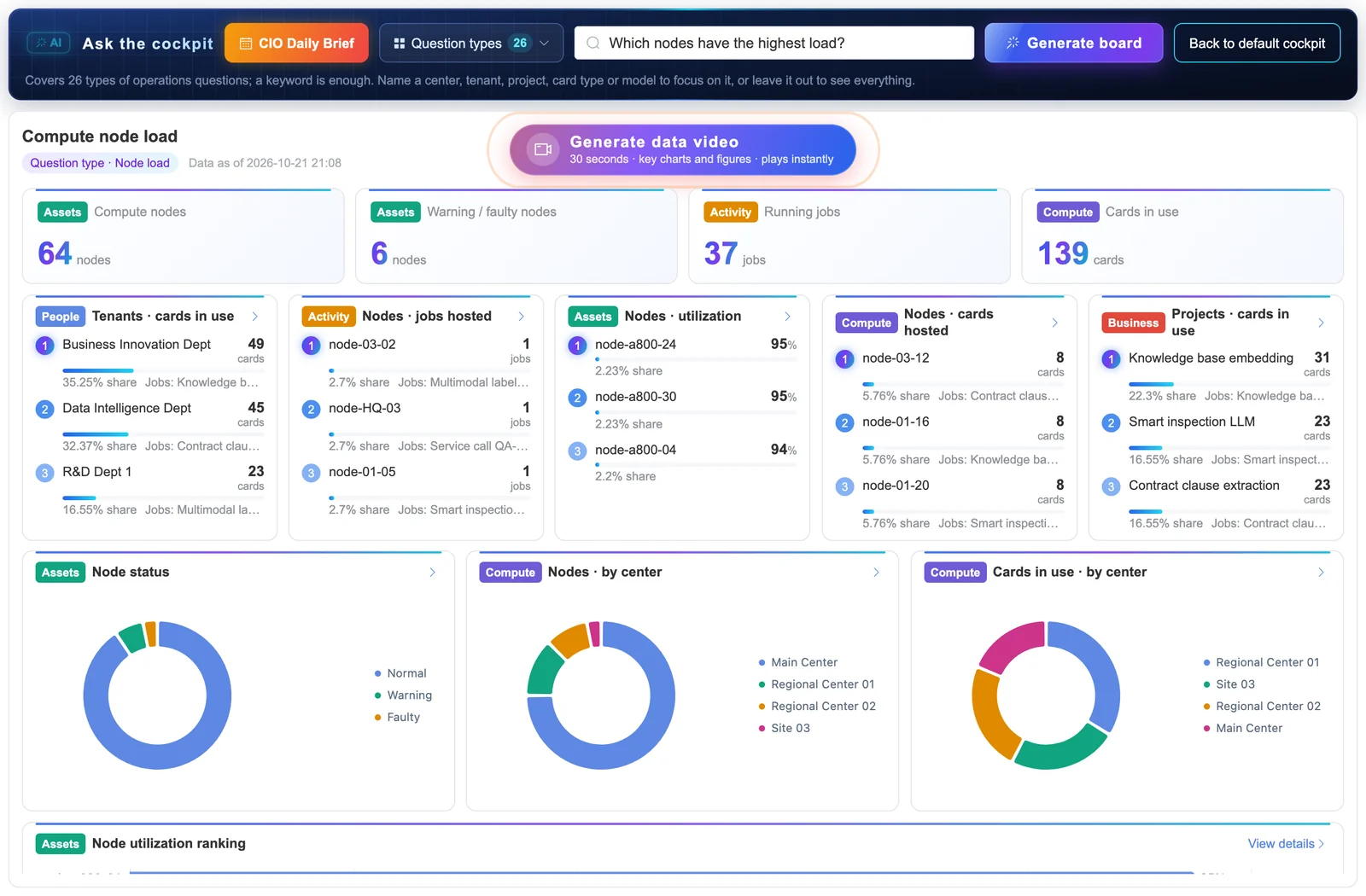
Board. The cockpit lays out a topic board: the top three items across people, events, assets, compute and business, how the total breaks down, and how sites or tenants compare. Every block drills down to the underlying records.
Video. When the board is too dense to talk through, one click renders it as a 30-second data video with captions taken from the same numbers.
Twenty Questions Operators Ask Every Week
The preset library covers four areas. Each question carries its own data source, rule and threshold, set for your site, so the cockpit can answer it without an outside model.
Compute and scheduling
- How many accelerators are online, faulty or idle right now?
- Which projects and tenants are using GPUs today?
- Which jobs are queued, and why?
- Which GPUs are idle and could be reclaimed?
- Which training jobs failed, and for what reason?
Models and tokens
- Is today's token output on plan?
- What does one token cost us in power and depreciation?
- Is time to first token normal for each model?
- Which model services have a high error rate against their SLO?
- Which tenants are close to their quota?
Facility and energy
- Is the liquid-cooling loop healthy: temperature difference, flow and leaks?
- Which racks or zones are near their rated power?
- Which GPUs or nodes show temperature, memory ECC, fan or power alerts?
- Is storage healthy, and when will it fill up?
- Is the network dropping packets or flapping ports?
Operations and assets
- How many alerts are open, and how many were correlated?
- Which tickets and changes are past their deadline?
- Are firmware and driver versions consistent across nodes?
- Which assets come off warranty soon?
- How many devices and open issues does each team own?
A 30-Second Video When the Board Is Too Much
Some audiences will not read a dashboard. For them, the cockpit turns the board into a short video: an opening line, one scene per block with bars and figures that build on screen, and a closing summary. Captions are written from the board's own numbers, so the video says exactly what the board shows.
The video is drawn and encoded in the browser, usually in a few seconds, and can be saved as a file. Typical uses are a daily brief for management, a weekly capacity update, or a short clip for a customer review of a shared GPU service.
No External Model, No Data Leaving the Site
Many AI data centers cannot send operational data to a public AI service, whether because of contracts with tenants, security policy, or regulation such as NIS2. The AI Cockpit was built for that case. Matching, board layout, captions and video encoding all run locally. The answers come from the platform's own inventory, metrics, jobs, alerts and usage records.
Because the answers are rule-based, they are repeatable: the same question over the same data gives the same board. That matters when a number from the cockpit ends up in a management report.
Background reading: what an AI operations cockpit is, what an AI factory is and how GPU utilization is measured.
One Question Box, Several Audiences
Data center director or CIO
Gets a short answer to the question asked in the meeting, with the numbers behind it, instead of a link to a dashboard with forty panels.
Operations lead
Checks idle accelerators, open alerts, overdue tickets and cooling health from one question at the start of a shift.
Platform or service owner
Sees tenants near quota, model services outside their SLO and the jobs that are waiting for capacity.
Finance and capacity planning
Asks what a token or a GPU-hour costs this month and which projects drive the consumption.
The answers are only as good as the data underneath. Sensaka collects it from the hardware, the schedulers and the facility, and keeps the relationships in the AI infrastructure CMDB. Idle-GPU and quota questions draw on GPU pool operations and GPU usage metering; job questions on AI workload operations.
Frequently Asked Questions
Does the AI Cockpit send our data to an external AI model?
No. Questions are matched locally against a library of preset operational questions, and the board and video are built from data already inside the platform. The cockpit runs on-premises with the rest of Sensaka, and no external language model is called.
What happens if I ask a question that is not in the preset library?
The cockpit matches your words to the closest preset question. If it cannot recognise the question, it tells you which question it answered instead and lets you pick a closer one from the list of question categories, so you always know what the board is answering.
Who sets the thresholds behind each answer?
Your team does. Each preset question carries a rule and a threshold, for example how low utilization must stay and for how long before a GPU counts as idle. The defaults are adjusted to your site so the answers match how you already run the data center.
How is the 30-second video made?
The browser draws the board's numbers and charts frame by frame and encodes them into a short video, with captions generated locally from the same data. In a current browser this usually takes a few seconds, and the file can be saved and shared in a meeting or a report.
How is this different from the operations cockpit?
The operations cockpit is a fixed screen for supply, efficiency, service quality and cost, with every node visible. The AI Cockpit builds a new board for the question you ask. Most teams keep the operations cockpit on the wall and use the AI Cockpit for ad hoc questions.
Can we try it on our own data?
Yes. The free 30-day on-premises pilot connects Sensaka to part of your estate, and the cockpit answers questions from that data. Success criteria are agreed before the pilot starts.
Other Parts of the Same Platform
Every solution below runs on Sensaka for AI Data Centers and shares one inventory and one data foundation.
Ask Your Own Data Center a Question
Connect Sensaka to part of your estate in a free pilot and see what the AI Cockpit answers from your own inventory, jobs and alerts.
The pilot runs on-premises for 30 days, free of charge, with success criteria agreed before it starts.
Integrators and resellers: the Sensaka partner programme offers a 25% margin in the first year. Talk to us.