
AI Workload Monitoring: GPU Utilization, Power and Health per Training Job
GPU utilization for AI workloads, measured on the GPUs each job actually holds, with power, hardware health, queue reasons and failure causes in the same view.
Sensaka follows every training job and inference service from submission to release across Slurm and Kubernetes. It is part of the Sensaka for AI Data Centers, which runs on-premises.
The Scheduler Knows the Job, the Hardware Team Knows the GPU
A training job touches many systems. The scheduler knows it was submitted and when it started. The GPU tools know a card is busy or hot. The network and storage teams see their own counters, and the facility team sees rack power. When a job runs slowly, queues for hours or fails on day three, each team has a piece of the answer and nobody has the whole job.
Sensaka puts the job at the center. It links each job to the GPUs, nodes and containers it uses, then lays the hardware, network, storage and facility data for those resources next to the job's own state.
What Each Job State Tells You
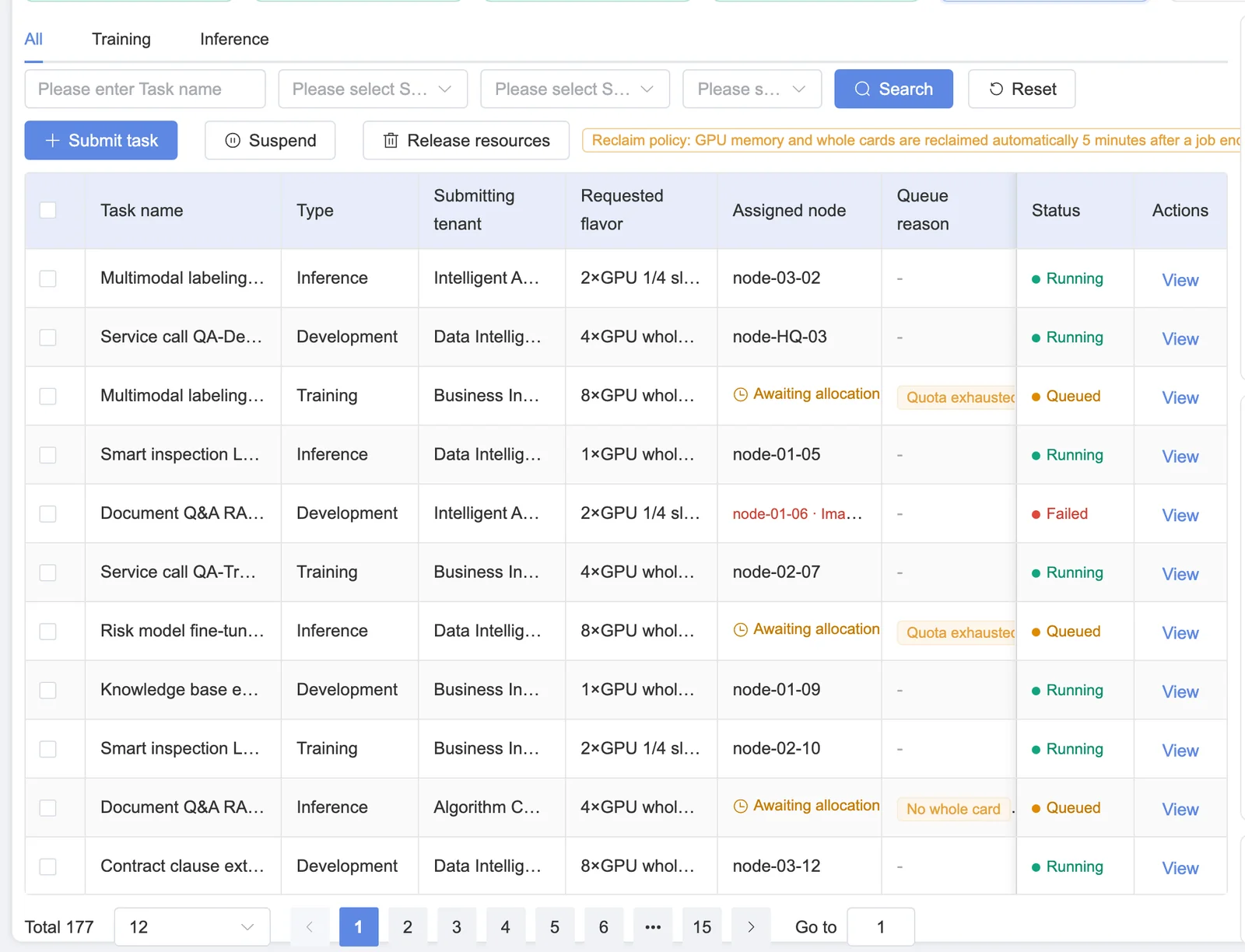
A queued job shows why it is waiting: no free capacity in the requested standard spec, a tenant quota reached, or a higher-priority job ahead. Jobs are queued and prioritized by policy, and a higher-priority job can preempt a lower one. Before that happens, the platform forces a checkpoint save so the preempted job loses as little work as possible.
Resource Use per Job, Not per Cluster
Cluster averages hide the job that is stuck. For each running job Sensaka shows:
When GPU utilization drops, the GPU, network and storage curves sit on one time axis, so you can see whether the GPUs were waiting for data rather than short of work. The method is described on the AI infrastructure observability page; the GPU-to-container relationships come from the AI infrastructure CMDB.
Protect Long Training Runs From a Single Bad Card
A training run that lasts days is only as reliable as its weakest GPU. Four practices keep one failing card from costing the whole run.
Spot degradation early
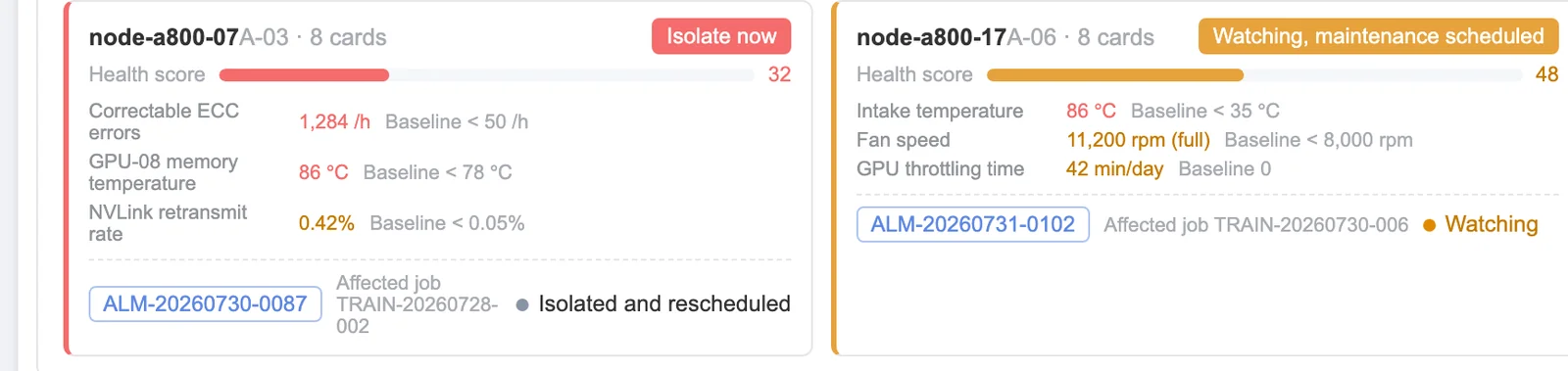
Rising memory ECC counts, NVLink errors, temperature trends and GPUs that run slower than their peers are flagged before they take a node down.
Keep checkpoints visible
Checkpoint saves are triggered by step count and by time. The platform shows when the last checkpoint was written, where, and how long the write took, and forces a save before a job is preempted.
Isolate with a person in the loop
When a node is degraded, Sensaka suggests isolating it. An operator checks what is running and confirms before the node is taken out of scheduling.
Count the cost
Training time lost to an interruption is measured and written to the event stream, so reliability problems show up in numbers instead of anecdotes.
Completed, Failed, or Serving
Completed
Resources are released and the job's GPU-hours are recorded against its tenant, project and spec for metering.
Failed
The failure reason is classified, repeated failures of the same job or on the same node raise an alert, and the job success rate is tracked per cluster and tenant.
Inference services
Long-running model services are tracked by time to first token, throughput and error rate per model, against the SLO you set.
GPU-hours from finished jobs feed GPU usage metering, and questions such as "which training jobs failed, and why?" are presets in the AI Operations Cockpit. Background: what GPU utilization measures and what MFU is.
Frequently Asked Questions
Which schedulers does Sensaka work with?
Slurm and Kubernetes. Training jobs commonly run on Slurm and inference services on Kubernetes; Sensaka reads both and shows them in one job view, so operators do not switch tools to follow a job.
How do you measure GPU utilization for AI workloads?
Per card, from the accelerator's own counters, and then per job through the binding between GPUs and containers. That gives utilization for the exact GPUs a job holds, not an average across the node or cluster.
Can Sensaka show power per training job?
It shows the power drawn by the GPUs a job is bound to, from card-level readings, and sums it over the run. Rack and facility power come from the same platform, so energy per project can be added to usage reports with an agreed allocation rule.
Why is my job still queued?
The job view gives the queue reason for each waiting job, for example no free capacity in the requested spec, a tenant quota reached, or a higher-priority job ahead. If a job waits longer than the time you set, it is flagged.
Does Sensaka restart failed training jobs on other nodes automatically?
Sensaka's role is to detect degradation early, keep checkpoints visible and suggest isolating a bad node, with an operator confirming. How a job resumes is decided by your scheduler and training framework; the platform records the interruption and the training time it cost.
Is GPU utilization the same as training efficiency?
No. Utilization says how busy the GPU was, not how much useful model work it did. Model FLOPs utilization is a different measure, explained in our glossary; Sensaka reports GPU utilization, allocation and GPU-hours per job.
Other Parts of the Same Platform
Every solution below runs on Sensaka for AI Data Centers and shares one inventory and one data foundation.
Follow Your Own Jobs From Queue to Release
In a free on-premises pilot, Sensaka connects to a Slurm or Kubernetes cluster and shows queue reasons, GPU utilization, power and health for the jobs running on it.
The pilot runs on-premises for 30 days, free of charge, with success criteria agreed before it starts.
Integrators and resellers: the Sensaka partner programme offers a 25% margin in the first year. Talk to us.