
GPU Pool Management for AI Clusters: Inventory, Allocation, Utilization
GPU monitoring software that knows where every accelerator is, how hard it is working and who is using it, then offers the capacity as standard specs that teams can request.
Sensaka brings NVIDIA, AMD and other accelerators from different servers, clusters and sites into one inventory and one set of pools. It is part of the Sensaka for AI Data Centers, which runs on-premises.
GPUs Arrive in Batches and Get Managed in Silos
Accelerators are usually bought project by project. A few years later a data center holds several generations from more than one vendor, spread over clusters that were set up by different teams. Each vendor has its own tool, each cluster its own scheduler, and the master list lives in a spreadsheet that is out of date the week after it is updated.
The cost shows up as idle hardware next to waiting jobs. One team holds GPUs it barely uses while another queues for days, and nobody can say quickly how much capacity is really free. Pool operations start with a reliable inventory and end with allocation rules that everyone can see.
A GPU Inventory Read From the Hardware
Sensaka discovers accelerators through the servers' management controllers and in-band collectors, then keeps each card in the same inventory as its server, rack and site. Because the data comes from the hardware, it stays current without anyone retyping it.
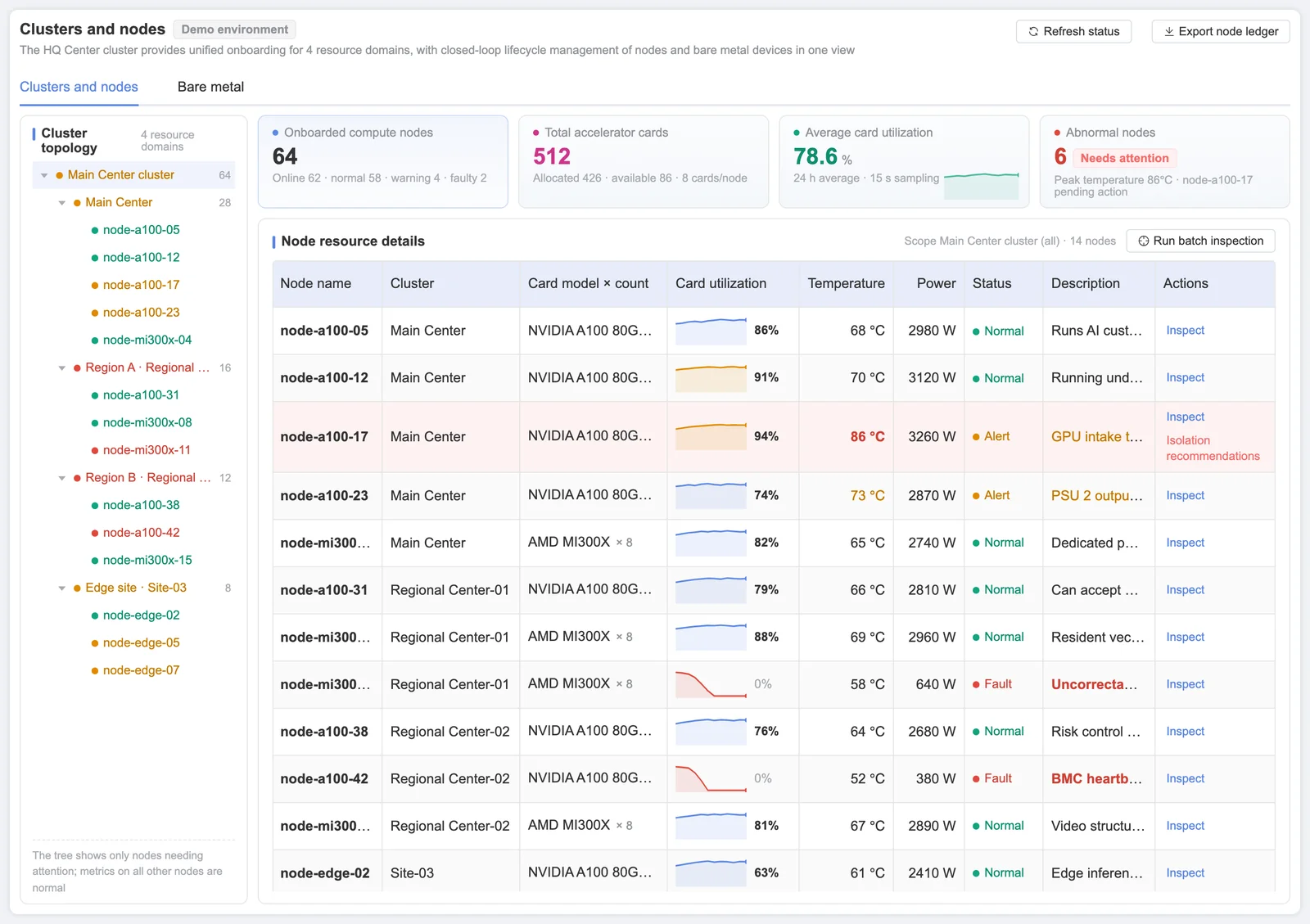
Clusters at a central site, regional sites and edge locations appear in one tree. Drill from a site to a cluster, a node and a single card, and see which jobs run on it before you touch it.
GPU Utilization for AI Workloads, Per Card, Pool and Tenant
Most GPU monitoring tools stop at the card: a vendor utility shows utilization, memory and temperature for the GPUs in one server or one cluster. That is useful for an engineer at a console and of little help to whoever has to decide where the next job runs. Sensaka reads the same per-card signals, then rolls them up the way the capacity is actually managed.
Per card
Utilization, memory use, temperature and power for every accelerator, with the job and container it is bound to.
Per pool and spec
Allocated, busy and idle capacity for each pool and standard spec, so you can see which accelerator models are short and which sit unused.
Per tenant and project
GPU-hours reserved against GPU-hours actually busy, and the idle rate for each tenant, project and site.
Utilization only means something next to allocation, so every figure is shown against what was reserved. For the definitions behind these numbers, see what GPU utilization measures and what a GPU pool is.
Provision Servers Into the Pool Without Manual Steps
New GPU servers spend too long between delivery and first job. Sensaka automates bare-metal provisioning so a racked server reaches the pool through the same checks every time.
BMC setup and power control
The server's management controller is configured out of band, including power and boot order, before any operating system is involved.
PXE operating system install
Operating systems are installed in batches over the network instead of one server at a time.
Drivers and runtime
GPU drivers and the matching runtime are installed for the accelerator model in the server.
Burn-in gate
The server is stress-tested and checked against the firmware baseline, including ECC and NVLink checks. A server that fails stays out of the pool.
Join the cluster
A server that passes joins the Kubernetes or Slurm cluster and becomes allocatable capacity.
Allocate by Spec and Quota, Reclaim What Sits Idle
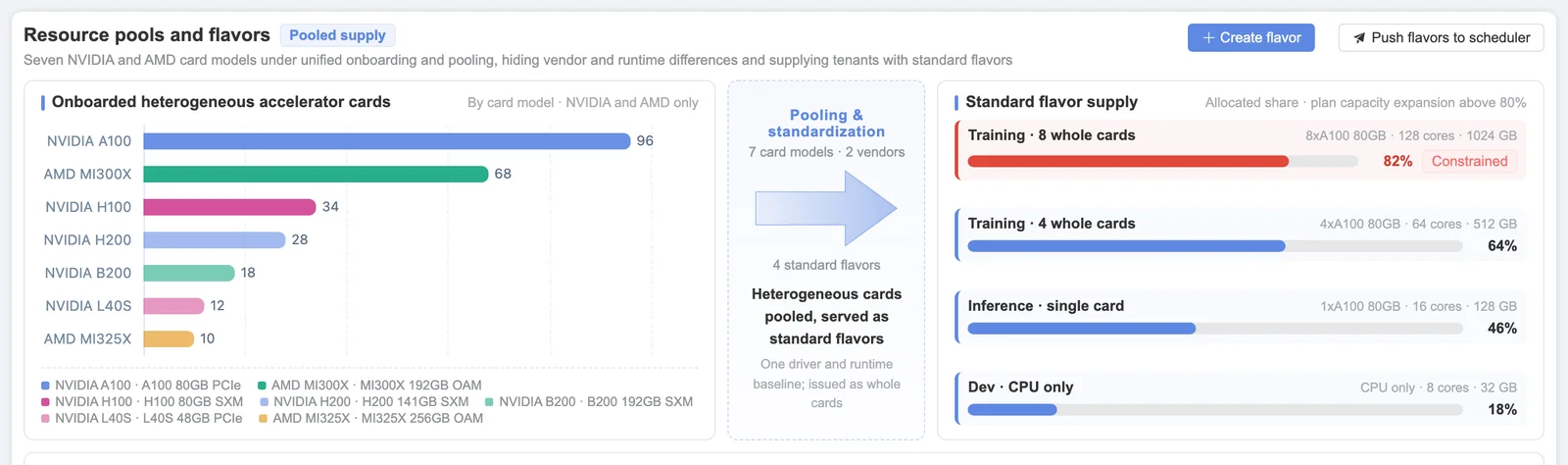
Once the inventory is right, the pool becomes something teams can request from. Four controls keep the allocation fair and visible.
Standard specs
Capacity is offered as a small set of standard specs, for example by accelerator model and card count, so teams request a spec instead of a named server.
Tenant quotas
Each tenant or project gets a quota in GPU-hours, tokens and storage. Requests beyond the quota are held back until capacity or quota frees up.
Queues and priority
Requests queue by policy. A higher-priority job can preempt a lower-priority one, and the queue shows why each job is waiting.
Release and reclaim
Capacity is released when a job completes or times out. GPUs whose utilization stays below your threshold for longer than you allow are flagged for reclaiming.
Every allocation is recorded in GPU-hours against a tenant, project and spec. Those records feed GPU usage metering, and the idle-GPU question is one of the presets in the AI Operations Cockpit.
Take a Bad Node Out of the Pool Before It Costs a Job
The node table shows every node's accelerators, utilization, temperature and the jobs running on it. When a node crosses a threshold, for example an accelerator running hot or a rising count of memory errors, Sensaka flags it with a suggestion to isolate it. The operator checks what is running, confirms, and marks the node unschedulable so no new work lands on it.
Hardware health comes from the same out-of-band collection that powers Sensaka's GPU infrastructure monitoring, so faults are visible even when the operating system is not responding. Rack power density and cooling readings sit alongside, from liquid cooling monitoring.
Frequently Asked Questions
Which accelerators can be pooled?
Sensaka manages NVIDIA, AMD and other accelerators in one inventory and one set of pools. The exact models and fields depend on the vendor's management interfaces; the supported list for your hardware is confirmed in the scoping call before a pilot.
Do we have to replace our scheduler?
No. Sensaka works with the Kubernetes and Slurm clusters you already run. Training jobs can stay on Slurm and inference services on Kubernetes, and both appear in the same pool and job views.
What is a standard spec?
A standard spec is a named unit of capacity, such as a given accelerator model and number of cards, that tenants request and that usage is metered against. Specs keep requests comparable across teams and make GPU-hour reports easy to read.
How does Sensaka find idle GPUs?
It compares allocation with actual utilization. A GPU that stays allocated but below the utilization threshold for longer than the period you set is listed as idle, together with the tenant and job holding it, so the owner can release it or the operator can reclaim it.
Can new servers join the pool automatically?
Yes, after they pass. A racked server is set up through its BMC, installed over PXE, given drivers and runtime, and burn-in tested against the firmware baseline. Only servers that pass the gate join the cluster.
How does this connect to cost reporting?
Every allocation is recorded against a tenant, project and spec, which produces the GPU-hour records used for showback and internal cost allocation on the GPU usage metering side of the platform.
Other Parts of the Same Platform
Every solution below runs on Sensaka for AI Data Centers and shares one inventory and one data foundation.
Get One Accurate View of Your GPU Capacity
In a free on-premises pilot, Sensaka discovers the accelerators in part of your estate, builds the pools and shows how much capacity is allocated, used and idle.
The pilot runs on-premises for 30 days, free of charge, with success criteria agreed before it starts.
Integrators and resellers: the Sensaka partner programme offers a 25% margin in the first year. Talk to us.