What Is an AI Operations Cockpit?
An AI operations cockpit is a management screen that puts the key figures of an AI data center (capacity, efficiency, service quality and cost) on one page, with drill-down to the device or job behind each number. An AI Cockpit adds one step: you type a question and it builds a board that answers it.
What an operations cockpit shows
An AI data center runs on several systems: hardware monitoring, the scheduler, metering, ticketing, the model gateway. Each has its own dashboard. An operations cockpit pulls the figures that matter to management onto one screen and gives each one a single definition, so “GPU utilization” means the same thing in every report. A typical layout has five metric groups:
- Resource supply: accelerators and nodes online and available, by cluster
- Production efficiency: GPU utilization, jobs running and queued, jobs completed today
- Service quality: token success rate, open alerts, node health
- Operating cost: GPU-hours this month, idle rate, cost per token
- Business consumption: usage by project and tenant
Below the figures, a grid of node tiles shows each node as normal, alerting or faulty. Clicking an abnormal tile drills down to the node, its accelerators, the jobs running on it and the open alerts.
Asking the cockpit a question
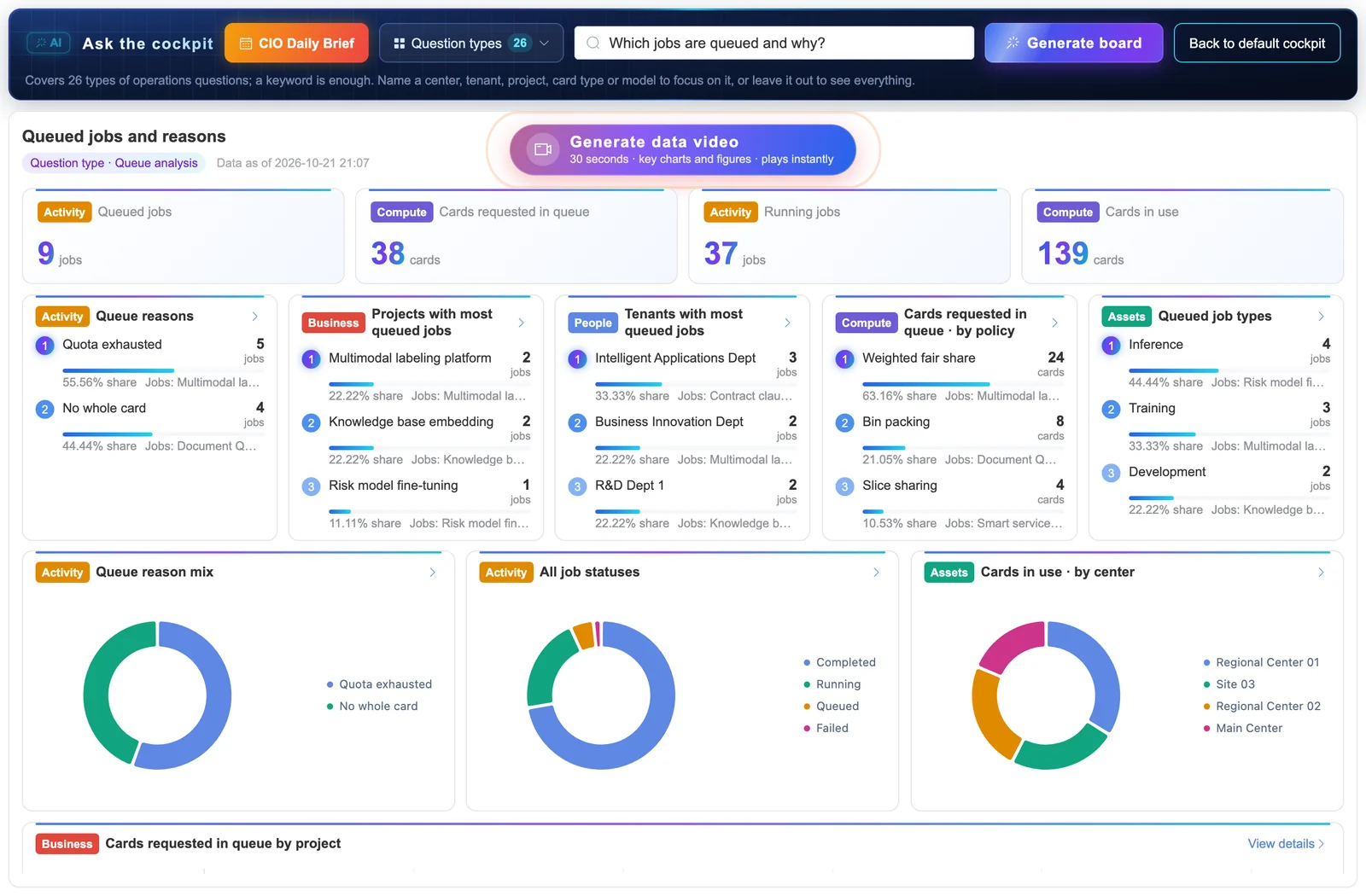
In an AI Cockpit, the user types a question or a keyword. The platform matches it to one of its preset questions. Each preset stores where its data comes from, the rule and threshold that decide what counts as a problem, an answer template and a suggested action. If the question names a site or a tenant, the board focuses on it.
The result is a topic board: a page built for that one question, showing only the data that answers it. It typically holds the top three items in each dimension (people, events, assets, compute and business), a composition chart, a comparison, and drill-down to the detail rows. When a board holds more than someone has time to read, it can be turned into a 30-second data video, described below.
Questions operators ask
- How many accelerators are online, faulty or idle?
- Which projects and tenants are using compute today?
- Which jobs are queued, and why?
- Which accelerators are idle and could be reclaimed?
- Is today's token output on plan?
- What is the cost per token?
- Which tenants are close to their quota?
- How many alerts are open, and how many were correlated?
Each of these maps to a preset with its own threshold. “Idle”, for example, is defined as utilization below a set level for longer than a set time, and both values are chosen per site. The GPU utilization guide explains why the definition matters.
What is a data video?
A data video is a short video generated automatically from live operational data: the key figures, charts and conclusions of a board played as captioned scenes, in about 30 seconds. It is a briefing format for people who need the state of the data center without reading the board, such as a CIO before a meeting or a shift lead at handover.
Every number in it comes from the board at the moment the video is made. The scenes are drawn from the charts themselves (bars growing, figures counting up) rather than filmed or produced by a generative video model, and the captions are written from the same numbers by rules. A typical sequence runs from a title screen through a wall of key figures, up to three top-3 rankings, a composition chart and a comparison, to a closing screen with the points to act on. Detail tables stay on the board.
Why local question matching matters
Operational data from an AI data center includes tenant names, project usage and cost figures. Many operators cannot send that to an outside service, and some sites have no internet route at all. A cockpit that matches questions inside the platform keeps the data where it is.
Local matching also makes answers repeatable: the same question on the same data gives the same board, and every threshold is visible and can be changed.
The cockpit in the Sensaka platform
Sensaka for AI Data Centers includes an operations cockpit with the five metric groups and node grid described above, and the AI Cockpit for typed questions. Both read the same data as the rest of the platform: hardware health, pools and queues, GPU-hour and token metering, alerts and tickets. The platform installs on-premises and the AI Cockpit needs no external language model.
Common questions
What is the difference between an operations cockpit and a dashboard?
A dashboard usually shows one system: a monitoring tool, a scheduler, a ticket queue. An operations cockpit brings the key figures from all of them onto one screen with one definition per metric, so capacity, efficiency, quality and cost can be read together, with drill-down to the detail behind each figure.
Does the Sensaka AI Cockpit use a large language model?
No. The AI Cockpit matches a typed question against preset questions inside the platform. Each preset defines its data source, rule, threshold and answer template, so it runs on-premises, calls no external model and sends no data outside the data center.
Who uses an operations cockpit?
Heads of AI data centers and CIOs who need the overall picture, operations managers who track capacity and incidents, and shift leads who need to know what changed since the last handover.
Can the cockpit's thresholds be changed?
Yes. Thresholds are set for each site during deployment, for example the utilization level below which an allocated accelerator counts as idle, or the queue time after which a waiting job is flagged.
Try it on your own hardware
The Sensaka pilot is free for 30 days and runs on-premises, inside your data center, with success criteria agreed before it starts. Integrators and resellers can also ask about the partner programme, which pays a 25% margin in the first year.