
GPU Pool Operations: Inventory, Allocation and Idle Capacity
Pooling GPUs is the easy decision. Running the pool well means keeping a trusted inventory, issuing capacity in shapes jobs can use, and finding idle cards before the next purchase request.
Most AI data centers start with GPU servers bought for specific teams. Each team runs its own cluster, and each cluster has busy weeks and quiet weeks that do not line up with anyone else's. Pooling those servers so capacity goes where the work is has become the standard answer, in enterprise clusters and in the larger AI factories that serve many tenants.
A GPU pool does not run itself, though. It has three jobs that each fail in their own way: keeping an inventory people trust, allocating capacity in shapes that jobs can use, and finding idle capacity before it turns into a purchase order. This post walks through each, then sets out a weekly routine.
Why pools replace team clusters
A dedicated cluster is simple to reason about: the team owns the hardware and decides what runs on it. The cost shows up as idle time. When one team's training run ends and the next one is weeks away, its GPUs sit unused while another team waits in a queue elsewhere.
A pool turns physical cards into shared capacity that is requested, allocated, released and governed by policy. It also forces a question that dedicated clusters can avoid: what exactly is in the pool? In a mixed estate the answer covers several accelerator models, often from NVIDIA, AMD and other vendors, in servers of different generations across more than one site. A pool that cannot describe its own contents cannot be scheduled fairly.
Inventory: the pool is only as good as its records
Pool inventory needs more than a device list. For every accelerator it needs the model, the node it sits in, the rack and site, its operational status, its firmware and driver versions, and what it is allocated to right now. Those facts change daily as nodes are repaired, upgraded or moved, so the inventory has to be maintained by discovery rather than by hand.
Sensaka for AI Data Centers identifies the accelerator types in each node and brings GPUs and NPUs from different vendors into one inventory, kept in the AI infrastructure CMDB with live relationships between card model, quantity, node, status and allocation. Clusters in a main site, regional sites and edge locations appear in one view, so a pool can span sites without a separate spreadsheet per location.
Health is part of the inventory. A card that is degrading should not be offered to a long training run. Card-level temperature, power and health readings, together with out-of-band hardware data read through the BMC, decide whether a card is in the usable part of the pool. New servers join through automated provisioning (BMC setup, PXE installation, drivers and runtime, cluster join), so the inventory grows without a manual step in the middle.
Allocation: standard specs, queues and quotas
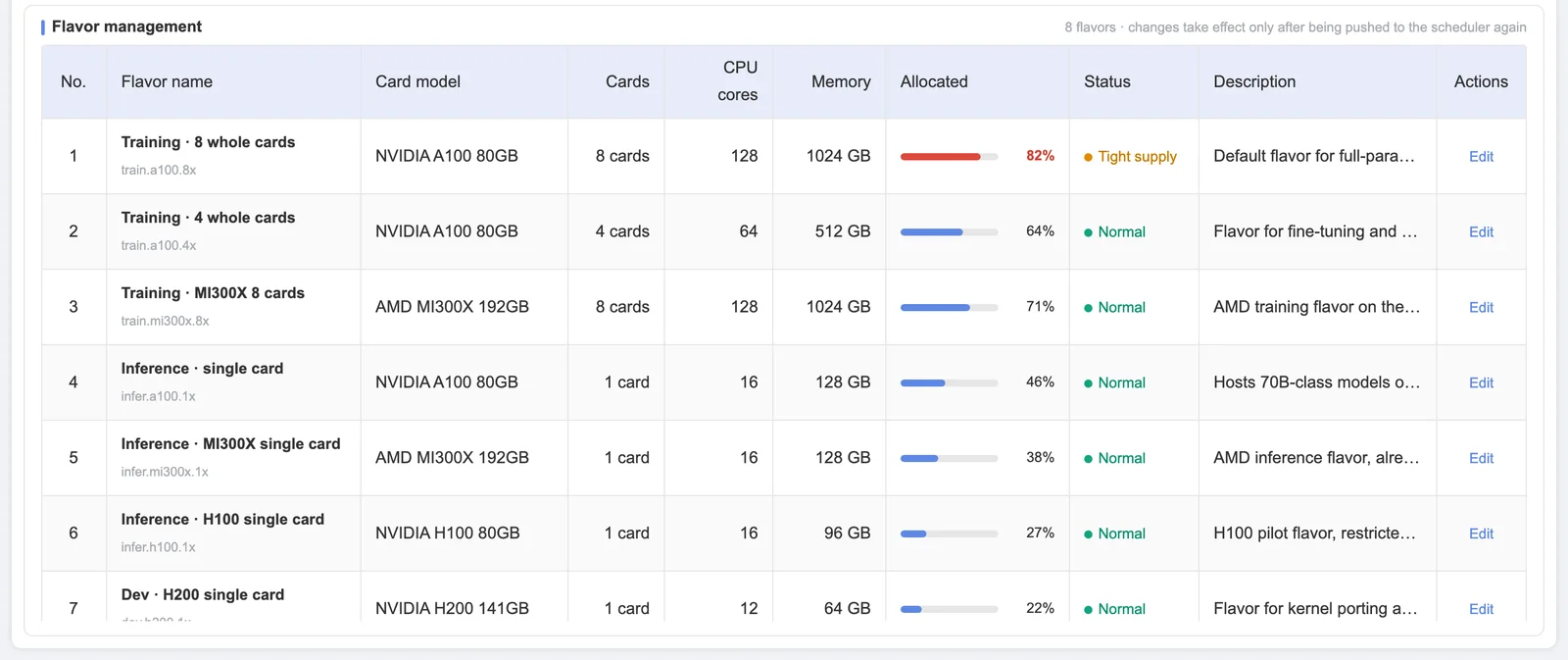
Pools are easier to run when capacity is issued in a small number of standard specs for training, inference and development, rather than as free-form requests. Standard specs make queues predictable, make metering comparable between projects, and stop the pool from fragmenting into odd shapes that nobody else can use.
On top of the specs sit the policies. Jobs wait in queues with priorities; a high-priority job can preempt a lower one; project and tenant quotas cap what each group can hold; and node-filling strategies decide whether new work packs onto partly used nodes or spreads out. Sensaka supports Slurm for batch training and Kubernetes for services, with dedicated GPU allocation, resource weighting and automatic release when a job completes, which is how capacity gets back into the pool without someone remembering to free it. The GPU pool operations page goes through these policies in more detail.
Some operators also split a single GPU between small jobs using the vendor's own partitioning features. Whether that helps a pool depends on the workload mix and on whether partitions can be metered and quota-controlled as cleanly as whole cards. Decide that per pool rather than for the whole center.
Three places idle capacity hides
Idle capacity is rarely a card that nobody has touched. It hides in three places, and each needs a different fix.
- Fragmented free capacity. The pool reports free GPUs, but they are spread across nodes in amounts no queued job can use. The fix is consolidation: move or pack work so that whole nodes come free. Sensaka analyzes GPU memory fragmentation and recommends consolidation.
- Quota held but unused. A team's quota protects capacity it is not using this month. The fix is a quota review, or borrowing rules that let others use it until the owner returns.
- Allocated but idle. A job holds GPUs and runs them at low GPU utilization, or a notebook keeps a card reserved overnight. The platform identifies workloads with high allocation and low utilization, and flags cards whose utilization stays below a threshold for longer than a set time as candidates to reclaim.
All three show up in metering. GPU usage metering records GPU-hours and idle rate by project, tenant, model and accelerator type, which turns "we think the pool is underused" into a list with owners.
A weekly pool routine
The teams that keep pools healthy tend to run the same short review every week:
- Check the inventory: nodes added or removed, cards isolated for faults, firmware and driver drift against the baseline.
- Check the queues: which jobs waited longest and why, and whether the cause was quota, priority or fragmentation.
- Check idle capacity in all three places, and agree an action and an owner for each item.
- Check the specs: if one spec keeps queuing while another sits idle, the spec mix no longer matches demand.
Half an hour with the right data replaces most of the arguments about whether the pool needs more GPUs. In Sensaka the same questions can be asked directly in the AI Cockpit, for example "which cards are idle and can be reclaimed", which builds the board for the review.
Frequently asked questions
What is GPU pool operations?
GPU pool operations is the day-to-day work of running shared GPU capacity: keeping the accelerator inventory accurate, issuing capacity through standard specs, queues, priorities and quotas, releasing it when jobs end, and finding and reclaiming idle capacity.
Why does a GPU pool show free capacity while jobs are still queued?
Usually because the free GPUs are fragmented across nodes in amounts that no queued job can use, or because they sit inside another team's quota. Consolidating work onto fewer nodes or adjusting quotas frees capacity in a usable shape.
How do you find idle GPUs in a pool?
Look in three places: free capacity that is fragmented, quota that is held but unused, and GPUs that are allocated but run at low utilization. Metering by project and tenant, plus a threshold on low utilization over time, turns each into a list of candidates with owners.
The GPU pool operations page covers pooling, specs, queues and quotas, and the Sensaka for AI Data Centers page shows how the pool connects to the CMDB, metering and workload operations. To try it on your own AI factory hardware, start a free 30-day on-premises pilot; list prices are on the pricing page, and resellers can join the partner programme with a 25% first-year margin.
Put a mixed GPU estate into one inventory and see where idle capacity hides. Start a free 30-day pilot on your own hardware, inside your network.
Start a Pilot →Sensaka for AI Data Centers
GPU pools, workload queues, GPU-hour and token metering, and an operations cockpit with an AI Cockpit, on one on-premises platform.
Related articles & analysis